
How it works explains the ideas. Building and development gives the rules and the tests. This page is the map: what to read, in what order, and where each step of the main flows happens.
Three ideas first
- The cells are the notebook; the buffer is a drawing of them. Each
cell is a struct (
emjupy-cell, inemjupy-core.el) holding its source and outputs. The buffer shows them, one overlay per cell. Typing changes the buffer;emjupy--sync-all-cellsreads it back into the cells. Saving writes the cells, never the buffer. When the two disagree, the cells win: the buffer is redrawn from them. - The code files are layers of
emjupy. Each file requires only files below it, in the order of the table below. A lower layer reaches a higher one only through a hook list, such asemjupy-comm-functions, which the higher layer joins. The keymap and the menu are an exception: they name commands of files above them. - Loading a file does nothing. Each layer has an
-enablefunction that wires it into a notebook buffer.emjupy-modecalls them, in order, when the buffer starts. So a side effect is always in a function, never at the top level.
The files, in reading order
Read bottom up. Skim each file's ;;;; headings before its code.
Every file has a commentary, then its options under ;;;; Options if it
has any, then one section per part.
| Order | File | Read for |
|---|---|---|
| 1 | emjupy-core.el |
the structs, a parsed address, trust, lookups |
| 2 | emjupy-terminal.el |
escape codes and carriage returns, string in, out |
| 3 | emjupy-ipynb.el |
nbformat JSON read and written, the .py export |
| 4 | emjupy-latex.el |
LaTeX previews, org loaded only when asked |
| 5 | emjupy-undo.el |
undo positions shifted by a redraw: read slowly |
| 6 | emjupy-faces.el |
appearance options, faces, theme colours |
| 7 | emjupy-http.el |
requests, errors (emjupy-http-error), XSRF |
| 8 | emjupy-render.el |
drawing a cell and its output, the rules |
| 9 | emjupy-cells.el |
syncing the buffer into the cells, checks |
| 10 | emjupy-redraw.el |
every redraw, and the undo step: read slowly |
| 11 | emjupy-commands.el |
the commands on cells |
| 12 | emjupy-kernel.el |
running cells, output arriving, reconnecting |
| 13 | emjupy-debug.el |
the debugger: breakpoints, stepping, variables |
| 14 | emjupy-toc.el |
the outline: headings for imenu, and the panel |
| 15 | emjupy-figures.el |
outputs opened in a window of their own |
| 16 | emjupy-widgets.el |
ipywidgets as controls in the buffer |
| 17 | emjupy-widget-page.el |
widgets that draw themselves, in a page |
| 18 | emjupy-remote.el |
where a server's files are: roots, tunnels, TRAMP |
| 19 | emjupy-lsp.el |
Eglot over the Jupyter WebSocket |
| 20 | emjupy-shadow.el |
the shadow buffer, and positions in it |
| 21 | emjupy-eglot.el |
Eglot on the shadow; completion, eldoc, M-. |
| 22 | emjupy-mode.el |
the mode, its keys, each layer turned on |
| 23 | emjupy-save.el |
saving, auto-saving, recovery copies |
| 24 | emjupy-notebook.el |
logging in, opening, switching, the menu |
| 25 | emjupy-dashboard.el |
the server dashboard |
| 26 | emjupy-tramp-open.el |
an .ipynb opened as a notebook, or by TRAMP |
| 27 | emjupy.el |
the package: version, everything required |
The same layers, drawn from the code's requires. Each file is above those it requires. Lines that a longer path implies are left out:
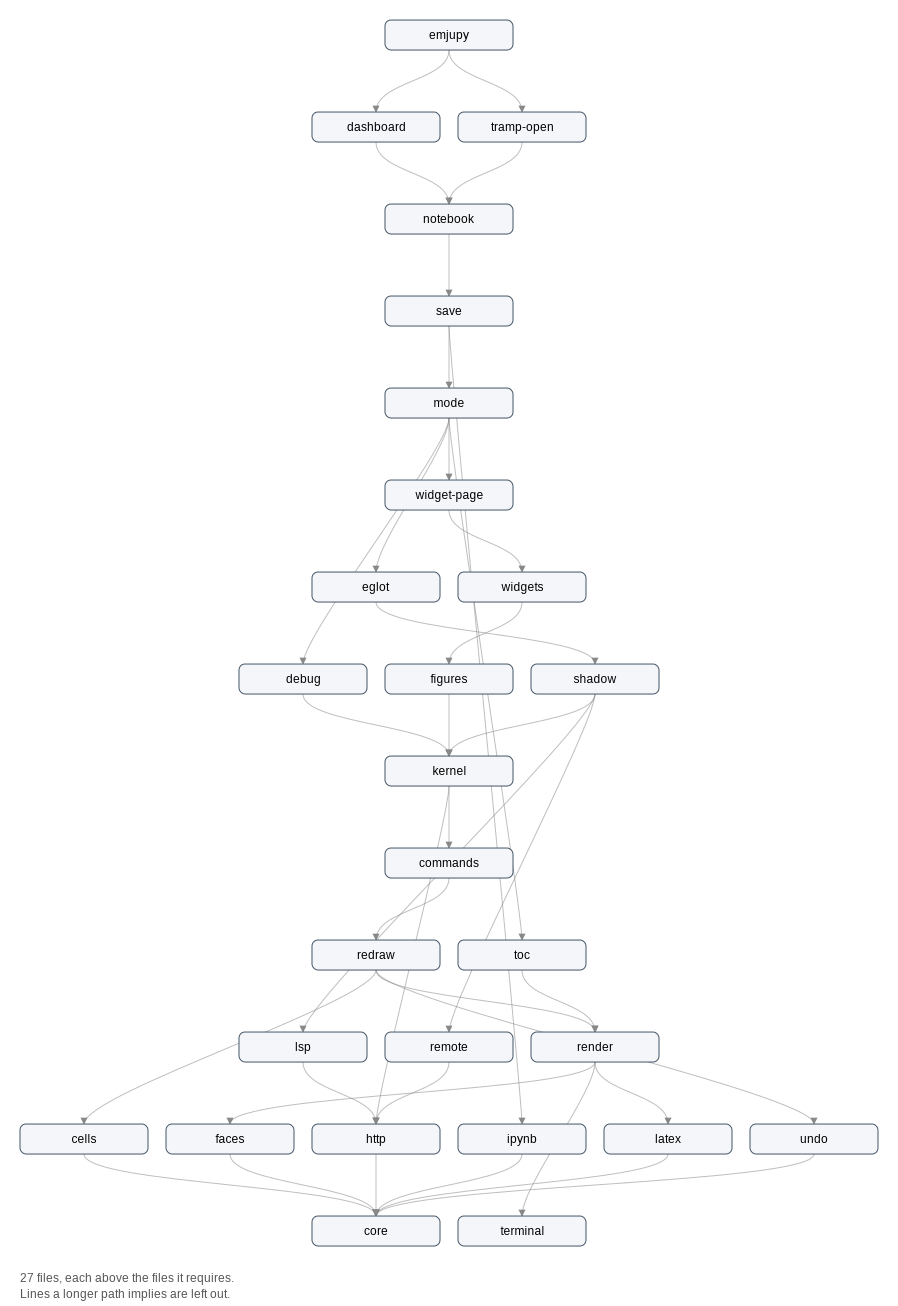
emjupy package.The main flows
Each flow follows a command one call at a time, each function's file in parentheses. Read them in this order and the rest of each file falls into place around them.
Opening a notebook
emjupy-login(notebook) works out the server's token withemjupy--resolve-token(notebook). It binds one kernel to the port withemjupy--bind-server-kernel(notebook): one port, one kernel.emjupy-open-notebook(notebook) does three things. It reads the notebook withemjupy--fetch-notebook(notebook), which parses it withemjupy--parse-ipynb(ipynb). It draws it withemjupy--draw-opened-notebook(notebook), which turns onemjupy-mode(mode) and callsemjupy--redraw-notebook(redraw). It connects withemjupy--attach-bound-kernel(notebook).emjupy-connect-kernel(kernel) opens the WebSocket. A notebook without a kernel gets one fromemjupy--spawn-and-connect-kernel(kernel), started through a session so it runs in the notebook's directory.
Running a cell
emjupy-execute-cell-at-point(kernel) syncs the cells, clears the old output in place, builds the request withemjupy--make-execute-request(kernel) and sends it withemjupy--ws-send(kernel).- Everything a kernel sends arrives at
emjupy--handle-ws-message(kernel). Outputs are built byemjupy--stream-output,emjupy--rich-outputandemjupy--error-output(kernel), thenemjupy--append-output-to-cell(kernel) merges stream text withemjupy--merge-stream-outputand asks for a redraw withemjupy--schedule-redraw(kernel). A request is done only when its reply and its closing idle have both come:emjupy--request-half-seen(kernel). - Drawing runs from a timer, not inside the socket callback.
emjupy--redraw-pending-output(kernel) callsemjupy--redraw-cell-output(redraw). That function draws only the new text when it can, withemjupy--append-stream-output(redraw); otherwise it draws the cell's output box.emjupy--terminal-apply(terminal) applies the escape codes in a stream, as progress bars use.
Editing the cells
- A structural command, such as
emjupy-split-cell(commands), wraps its work inemjupy--as-one-undo-step(redraw). That wrapper syncs, snapshots the cells, and records one undo step that restores them. - The command redraws only what changed, with
emjupy--redraw-cells-in-place(redraw), insideemjupy--atomic-redraw(redraw). A redraw finishes, or the notebook is redrawn from its cells at once. - Positions in the undo history after the change are shifted by
emjupy--undo-adjust(undo), which knows every entry shapebuffer-undo-listcan hold.
Saving
emjupy-save-notebook(save) callsemjupy--save-to-server(save), which sends the requestemjupy--notebook-request(ipynb) builds, after checking the file on the server has not changed since it was read.- When Emacs is idle,
emjupy--idle-save(save) writes a recovery copy withemjupy--recovery-write(save), in a folder made byemjupy--private-directory(core). It then saves to the server without waiting, withemjupy--autosave-async(save).
Language support
emjupy-start-language-support(eglot) gets the shadow buffer fromemjupy--ensure-shadow-buffer(eglot). The shadow buffer holds all code cells as one Python file;emjupy--build-shadow-content(lsp) makes its text.emjupy--eglot-connect(lsp) attaches Eglot over the Jupyter server's WebSocket. When the Jupyter server has nojupyter-lsp, Eglot attaches to a local server instead.- In the notebook, completion goes through
emjupy--cell-completion-at-pointand eldoc throughemjupy--cell-eldoc-function(both in eglot). Both useemjupy--cell-shadow-delegate(eglot), which maps the position into the shadow buffer.emjupy--xref-remap(eglot) maps definitions found there back to cells.
A dropped connection
emjupy--kernel-connection-closed (kernel) keeps the running cells and
starts emjupy--try-reconnect (kernel). On reconnecting,
emjupy--adopt-kept-runs (kernel) hands the cells to the new
connection, and the server replays what they missed.
A notebook opened through TRAMP
emjupy-open-this-notebook (tramp-open) on a TRAMP file takes the route
from TRAMP with emjupy--ssh-route (tramp-open). It finds or starts a
Jupyter server there, opens a tunnel with emjupy--open-tunnel
(tramp-open), and opens the notebook on it. emjupy--remote-root-for
(remote) decides how a server's files are reached in general.
The hard parts
Most functions are short. A few carry the complexity, and a change near them deserves the slowest reading:
emjupy--ensure-shadow-buffer(eglot) decides where the shadow file lives, when it is rebuilt, and when to stop trying. It covers local and remote files, with a back-off so that an unreachable host cannot hang Emacs. The steps that build the file and the buffer, fromemjupy--retire-moved-shadowon, are inemjupy-shadow.el. Attaching Eglot,emjupy--attach-plain-eglot, is inemjupy-eglot.el.emjupy--handle-ws-message(kernel): every message type the kernel sends, and which cell it belongs to.emjupy--reconcile-rules(render): the rules drawn so line numbers fall on code, not on the box lines.emjupy--undo-adjust(undo) andemjupy--as-one-undo-step(redraw) implement undo across redraws. A wrong position here does not fail; it rewrites the wrong text. The two are in separate files on purpose.emjupy--undo-adjustkeeps positions right for the redraws, so it sits below them. The undo step sits with the full redraw: undoing a step redraws the notebook, and a full redraw records a step. Those are three functions that call each other, which no file boundary can split.emjupy--terminal-apply(terminal): a small terminal emulator, for progress bars.
Reading with the tools
- The tests are the specification. Test names say what is promised
–
emjupy-test-a-running-remote-server-is-found-again– and the docstring why. A file's tests are intest/emjupy-FILE-test.el. - The history has the stories. Comments say why code is as it is;
git log -L :NAME:FILEshows every change to one function, with its reason. - Inspect a live notebook:
M-x emjupy-debug-check-invariantsreports whether the buffer and the cells agree.emjupy-report-box-geometryreports the widths drawn at.emjupy-lsp-diagnosereports which language server answers, and why.emjupy-versionreports what is loaded, and from where. - The dependency graph, above:
make dependency-graphredraws it from the requires, intohtml-content/.
Reviewing a change
Building and development specifies code style and rules. what to look for:
- Layers. No new require against the layers –
make dependency-graphfails on one – and a file requires what it uses. - Loading. Nothing new at the top level but definitions; a hook goes
in its layer's
-enablefunction. - The cells are the truth. An edit to the buffer goes through the
cells, and a redraw through
emjupy--atomic-redraw. - Undo. A command changing cells records one step, through
emjupy--as-one-undo-step. A redraw in place records nothing; a full rebuild records the one step that puts the cells back. - Remote. Nothing on the path of every keystroke waits on the network or calls TRAMP. That path is completion, eldoc and redrawing.
- Style. Options under
;;;; Options; messages start[emjupy];;;;###autoloadonly on entry points; lines of 80 columns; comments give the reason. - Tests and docs. A change of behaviour comes with a changed or added
test: a unit test and, if it touches a server, a live one.
make checkpasses. What a user sees is described in the user pages.