
emjupy edits and runs Jupyter notebooks in Emacs. It shows plots and
widgets inline, or in an external window or browser (see
Interactive output). emjupy
uses Emacs's own tools: eglot, xref, eldoc and tramp. It works
with whatever completion setup you already have (vertico, corfu,
orderless or anything else). Completion, documentation and M-. come
through eglot, from a language server that runs beside the kernel.
It talks to a running Jupyter server over the same HTTP and WebSocket
API that the browser uses. So a kernel on another machine works through
an ssh tunnel. The notebook stays a standard .ipynb that any other
Jupyter tool opens.
Try it with emacs -Q
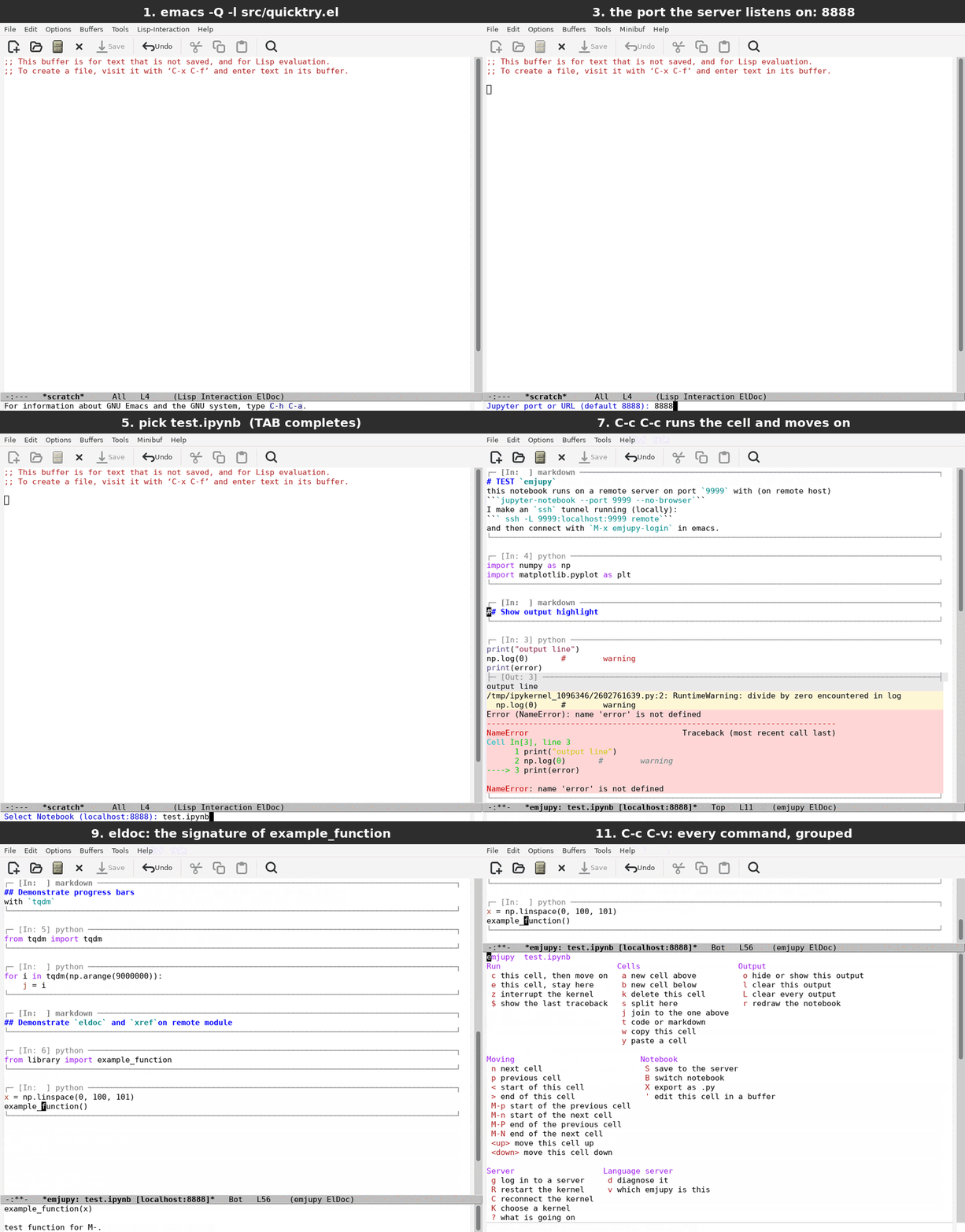
emacs -Q (Emacs 30.1).
This does not touch your own Emacs configuration. The repository ships
a small notebook, test_notebooks/test.ipynb, with a module next to it,
so there is something real to run. To test with your own notebooks,
jump to step 4.
Get emjupy.
bashgit clone https://github.com/mathren/emjupy cd emjupyA Python environment with Jupyter. Either create the one the notebook comes with,
bashconda env create -f test_notebooks/environment.yml conda activate test_emjupy
or install into one you have:
bashpip install jupyter-server ipykernel jupyter-lsp 'python-lsp-server[all]' matplotlib numpy tqdmjupyter-lspandpython-lsp-servergive completion, documentation andM-.; everything else works without them.Start a server in the notebook's directory, in its own terminal:
bashcd test_notebooks JUPYTER_TOKEN=abc jupyter server --no-browser --port=8888
Or start it on another machine, the same way, in a copy of
test_notebooks/or in any directory with notebooks. Then forward its port from this machine:bashssh -N -L 8888:localhost:8888 <remote machine>
Start Emacs from the repository root:
bashemacs -Q -l src/quicktry.el
-Qleaves your configuration out;quicktry.elputs emjupy on the load path and installswebsocket.elinto a temporary package directory, touching nothing in your setup.- Log in:
M-x emjupy-login RET 8888 RET, andabcwhen asked for the token. Picktest.ipynbfrom the list. - Try it:
C-c C-cruns the cell at point and moves to the next;M-.onexample_functionjumps to its definition inlibrary.py;C-c C-vshows every command, grouped by what it is for.
Features
- persistent kernel session (to load large dataset once and re-use them)
- remote or local kernel (just needs port and token)
- in-line rendering of output including images
- adopts the kernel already running behind a port, and the Python environment it runs in
- completion, documentation and
M-.througheglot, from a language server running beside the kernel viajupyter-lsp - resilient to connection drops (remote kernel keeps running, reconnect Emacs)
- toggle hide/show output without re-running cells
- a debugger, as JupyterLab's: breakpoints in cells, stepping, variables
- an outline of the headings, to jump through: imenu, and a panel beside the notebook
- interactive plotly figures open in a window of their own;
ipywidgetscontrols work in the buffer, and widgets that draw themselves open in a live page - every cell command – insert, delete, move, split, join – is undone and redone like any edit
ein-like workflow and key bindingsemjupy-notebook-list, likeein:notebooklist, to browse notebooks and the files beside them
Installation
Clone this repo, and add its src/ directory to load-path in your
init.el:
(add-to-list 'load-path "/path/to/emjupy/src")
(require 'emjupy)
websocket.el must be installed too, from GNU ELPA or MELPA.
Or with use-package (without :rev :newest, the latest release rather
than the latest commit):
(use-package emjupy
  :vc (:url "https://github.com/mathren/emjupy"
       :lisp-dir "src"
       :rev :newest)
  :config
  (setq emjupy-render-latex t))
:lisp-dir "src" is needed: without it the package installs but
emjupy cannot be loaded.
Or with whichever package manager you already use – each installs
websocket.el too:
;; package-vc, built into Emacs:
(package-vc-install '(emjupy :url "https://github.com/mathren/emjupy"
                             :lisp-dir "src"))

;; elpaca:
(elpaca (emjupy :host github :repo "mathren/emjupy"
                :files ("src/*.el" "src/*.py" (:exclude "src/quicktry.el"))))

;; straight.el:
(straight-use-package
 '(emjupy :type git :host github :repo "mathren/emjupy"
          :files ("src/*.el" "src/*.py" (:exclude "src/quicktry.el"))))
The sources are in src/, so each tool is told where: :lisp-dir for
package-vc, :files for elpaca and straight. The :files entries also
install the figure window, emjupy-figure-window.py, and leave out
quicktry.el, a development tool.
Alternatively, M-x package-install-file on the tarball make package
builds.
Pending on MELPA.
The least to set up
Nothing, in Emacs: the defaults are meant to be kept. Open a notebook
file and M-x emjupy-open-this-notebook, or log in to a server with
M-x emjupy-login.
The kernel's Python environment, on this machine or on one reached through TRAMP, needs:
pip install jupyter-server ipykernel jupyter-lsp python-lsp-server
The last two give completion and documentation from the language server
beside the kernel, which sees the environment's packages. Without them,
a language server on this machine answers, and the mode line says
LSP: this machine. emjupy asks for the environment the first time in
a folder, and remembers it.
M-x customize-group RET emjupy shows the options a user meets; the
timings, retries and plumbing are under Advanced.
Landscape of other Emacs and Jupyter packages
| Feature | emjupy |
ein |
emacs-jupyter |
ob-jupyter |
|---|---|---|---|---|
| Notebook-style buffer of cells | ✓ | ✓ | ✗ | ✗ |
Reads and writes standard .ipynb |
✓ | ✓ | ✗ | ✗ |
| Notebook list UI | ✓ | ✓ | ✗ | ✗ |
| Undo across cell operations | ✓ | ✗ | – | ✓ |
| Interactive widgets | ✓ | ✗ | ~ (in a browser) | ? |
| Kernel via Jupyter server HTTP + WebSocket (ssh tunnel is enough) | ✓ | ✓ | ✓ | ✓ |
No emacs-zmq dynamic module required |
✓ | ✓ | ✗ | ✗ |
eglot (completion, M-., rename across cells) |
✓ | ✗ | ✗ | ✗ |
| Kernels other than Python | ✗ | ✓ | ✓ | ✓ |
| Oldest Emacs supported | 30.1 | 26.1 | 27 | 27 |
| Maintained | ✓ | ✗ | ✓ | ✓ |
✓ = supported, ✗ = not supported, ~ = partly, – = does not apply (a REPL has no cell operations), ? = not documented. Checked against each project's README and package header.
They differ in what they edit and in how they reach the kernel. ein
and emjupy edit .ipynb notebooks as cells, over a Jupyter server's
HTTP and WebSocket API, so an ssh tunnel is enough. emacs-jupyter is
a kernel client for a REPL and for Org-babel blocks. It has no notebook
buffer and no .ipynb. It requires the emacs-zmq dynamic module,
whose ZMQ cannot reach a notebook server's kernels. It can use a
server's REST API through TRAMP-style /jpy:host#port:name names. Its
widgets are experimental, and show in a browser. For notebook-level
eglot integration, emjupy supports Python only (other kernels are
untested). It needs jupyter-lsp on the server, and Emacs 30.1 or
later.
ein was my working tool for over a decade, but it is
unmaintained: it
has been sunset since 2023. Its README calls its architecture
"fundamentally incompatible with LSP", and points to
xjupyter. That
successor is at 0.0.1. It runs local kernels through a Python
jupyter_client helper, not through a Jupyter server, and it needs
mode-overlay, which GNU Emacs 30.1 lacks. I share code with people
who do not use Emacs, so ob-jupyter is not an option, and
emacs-jupyter does not suit me.