
emjupy edits and runs Jupyter python notebooks in Emacs. It talks to a
running Jupyter server over the same HTTP and WebSocket API the
browser uses, so a kernel on another machine works through an ssh
tunnel, and the notebook stays a standard .ipynb that any other
Jupyter tool opens. Completion, documentation and M-. come through
eglot, from a language server running beside the kernel.
It uses Emacs's own tools – eglot, xref, eldoc, tramp – with
whatever completion setup you already have (vertico, corfu,
orderless or anything else). See "Looks" tab for screenshots.
Interactive plots and widgets can be shown in an external window or browser.
Try it with emacs -Q
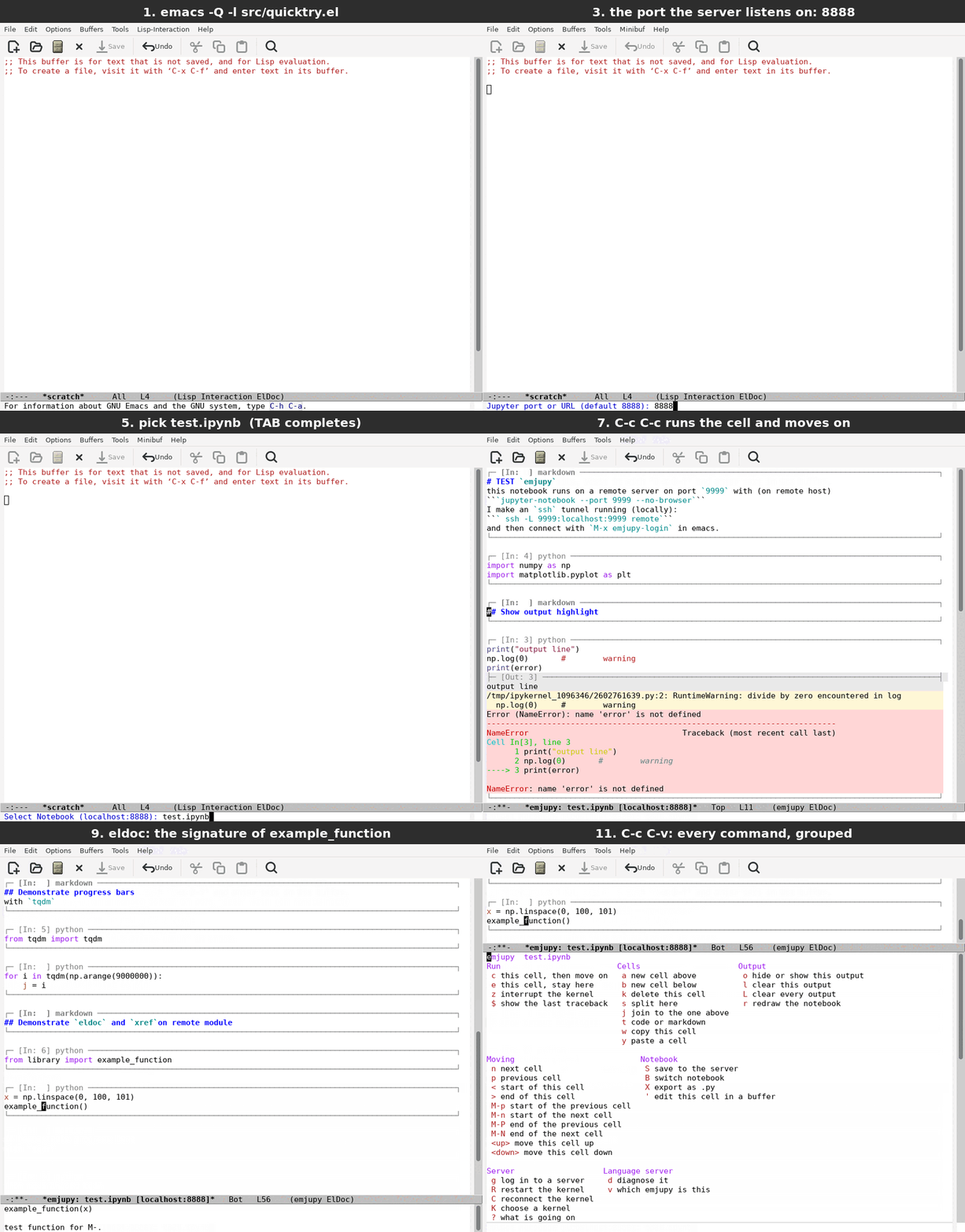
emacs -Q (Emacs 30.1).
Without touching your own Emacs configuration. The repository ships a
small notebook, test_notebook/test.ipynb, with a module beside it, so
there is something real to run. To test with your own notebooks, jump
to step 4.
Get emjupy.
bashgit clone https://github.com/mathren/emjupy cd emjupyA Python environment with Jupyter. Either create the one the notebook comes with,
bashconda env create -f test_notebook/environment.yml conda activate test_emjupy
or install into one you have:
bashpip install jupyter-server ipykernel jupyter-lsp 'python-lsp-server[all]' matplotlib numpy tqdmjupyter-lspandpython-lsp-serverare what give completion, documentation andM-.; without them everything else still works.Start a server in the notebook's directory, in its own terminal:
bashcd test_notebook jupyter server --no-browser --port=8888 --IdentityProvider.token=abcThe server can equally run on another machine – started the same way, in a copy of
test_notebook/or any directory with notebooks. Then forward its port from this one, and use the same port below:bashssh -N -L 8888:localhost:8888 <remote machine>
Start Emacs from the repository root:
bashemacs -Q -l src/quicktry.el
-Qleaves your own configuration out;quicktry.elputs emjupy on the load path and installs its one dependency,websocket.el, into a temporary package directory, so nothing in your setup is touched.- Log in:
M-x emjupy-login RET 8888 RET, andabcwhen asked for the token. Picktest.ipynbfrom the list. - Try it:
C-c C-cruns the cell at point and moves to the next;M-.onexample_functionjumps to its definition inlibrary.py;C-c C-vshows every command, grouped by what it is for.
Features
- persistent kernel session (to load large dataset once and re-use them)
- remote or local kernel (just needs port and token)
- in-line rendering of output including images
- adopts the kernel already running behind a port, and the Python environment it runs in
- completion, documentation and
M-.througheglot, from a language server running beside the kernel viajupyter-lsp - resilient to connection drops (remote kernel keeps running, reconnect Emacs)
- toggle hide/show output without re-running cells
- interactive plotly figures open in a window of their own;
ipywidgetscontrols work in the buffer, and widgets that draw themselves open in a live page - every cell command – insert, delete, move, split, join – is undone and redone like any edit
ein-like workflow and key bindingsemjupy-notebook-list, likeein:notebooklist, to browse notebooks and the files beside them
Installation
Clone this repo, add its src/ directory to load-path, and load it
with these lines in your init.el or similar:
(add-to-list 'load-path "/path/to/emjupy/src")
(require 'emjupy)
websocket.el must be installed too, from GNU ELPA or MELPA.
Or with use-package (remove the :rev :newest line to use the latest
release rather than the latest commit):
(use-package emjupy
  :vc (:url "https://github.com/mathren/emjupy"
       :lisp-dir "src"
       :rev :newest)
  :config
  (setq emjupy-render-latex t))
:lisp-dir "src" is needed: the sources are in src/, and without it
the package installs but emjupy cannot be loaded.
Alternatively, M-x package-install-file on the tarball make package
builds.
Pending on MELPA.
Landscape of other Emacs and Jupyter packages
| Feature | emjupy |
ein |
emacs-jupyter |
ob-jupyter |
|---|---|---|---|---|
| Notebook-style buffer of cells | ✓ | ✓ | ✗ | ✗ |
Reads and writes standard .ipynb |
✓ | ✓ | ✗ | ✗ |
| Notebook list UI | ✓ | ✓ | ✗ | ✗ |
| Undo across cell operations | ✓ | ✗ | – | ✓ |
| Interactive widgets | ✓ | ✗ | ~ (in a browser) | ? |
| Kernel via Jupyter server HTTP + WebSocket (ssh tunnel is enough) | ✓ | ✓ | ✓ | ✓ |
No emacs-zmq dynamic module required |
✓ | ✓ | ✗ | ✗ |
eglot (completion, M-., rename across cells) |
✓ | ✗ | ✗ | ✗ |
| Kernels other than Python | ✗ | ✓ | ✓ | ✓ |
| Oldest Emacs supported | 30.1 | 26.1 | 27 | 27 |
| Maintained | ✓ | ✗ | ✓ | ✓ |
✓ = supported, ✗ = not supported, ~ = partly, – = does not apply (a REPL has no cell operations), ? = not documented. Checked against each project's README and package header.
The packages differ mainly in what they edit and how they reach the
kernel. ein and emjupy edit .ipynb notebooks in a buffer of cells over
the HTTP and WebSocket API of a Jupyter server, which is why an ssh
tunnel is enough. emacs-jupyter is a kernel client built around a REPL
and Org-babel source blocks, so it has no notebook buffer and does not
read .ipynb. It requires the emacs-zmq dynamic module, whose ZMQ
transport cannot reach the kernels behind a notebook server, although it
can also talk to a server's REST API through TRAMP-style
/jpy:host#port:name names; its widget support is experimental, through
an external browser. In exchange for notebook-level eglot integration,
emjupy is Python only (other kernels untested), needs jupyter-lsp on
the server, and requires Emacs 30.1+.
ein was my working tool for more than a decade, but it is
unmaintained – its README has called it sunset since 2023, and its
architecture "fundamentally incompatible with LSP". That README now
points to xjupyter, a greenfield successor at version 0.0.1, which runs
local kernels through a Python jupyter_client helper rather than a
Jupyter server, and needs mode-overlay, which GNU Emacs 30.1 does not
have. I need to share code with non-emacs users, so ob-jupyter isn't
an option, and emacs-jupyter doesn't seem the right tool for me.